
Start planning an office relocation well in advance, allowing progressively more time for larger or more complex moves with IT dependencies. The first three moves to make: appoint a single move coordinator, pull your lease to check notice periods and restoration clauses, and lock a budget with clear categories for movers, IT, and packing supplies. From there, the checklist splits into vendor coordination, IT cutover, legal filings, move-day logistics, and post-move verification.
TL;DR:
- Early planning, especially for large moves, should start at least six months in advance to secure building approvals, vendors, and permits.
- Confirm that the new office space meets all occupancy, zoning, accessibility, and regulatory requirements before signing any contracts.
- Create a detailed inventory and purge obsolete or duplicate items to reduce moving costs and prevent clutter in the new space.
- Implement a color-coded labeling system and staged IT cutover plan to ensure smooth unpacking and minimal downtime on move day.
- Finalize all administrative tasks, such as updating IRS and state filings, securing insurance, and testing systems, within the first month after the move.
Table of Contents
- Building Your Office Move Timeline: 12 Months Out
- What Should Happen 6 to 12 Months Before the Move?
- How Do You Inventory and Purge Before an Office Move?
- Packing, Labeling, and IT Cutover: 1 to 3 Months Out
- The Final Two Weeks: Confirming Details and Prepping Day-One Kits
- What Happens on Move Day and the Following 48 Hours?
- Post-Move Checklist: Administrative Cleanup in the First Month
- Field Notes: How Professional Crews Protect Property During a Move
- Why a Written Timeline Beats a Mental Checklist
- Official Guidance Worth Bookmarking
- Sources
- FAQ
Building Your Office Move Timeline: 12 Months Out
The biggest lever in any relocation isn't the moving crew. It's how early you start. Industry data consistently shows early planning is the single biggest predictor of a smooth move, and that holds whether you're moving a ten-person satellite office or a 200-person headquarters.
Frame your countdown around your first productive day at the new site, not the day the truck arrives. A move that finishes on Friday but leaves phones dead until Wednesday hasn't actually saved you anything.
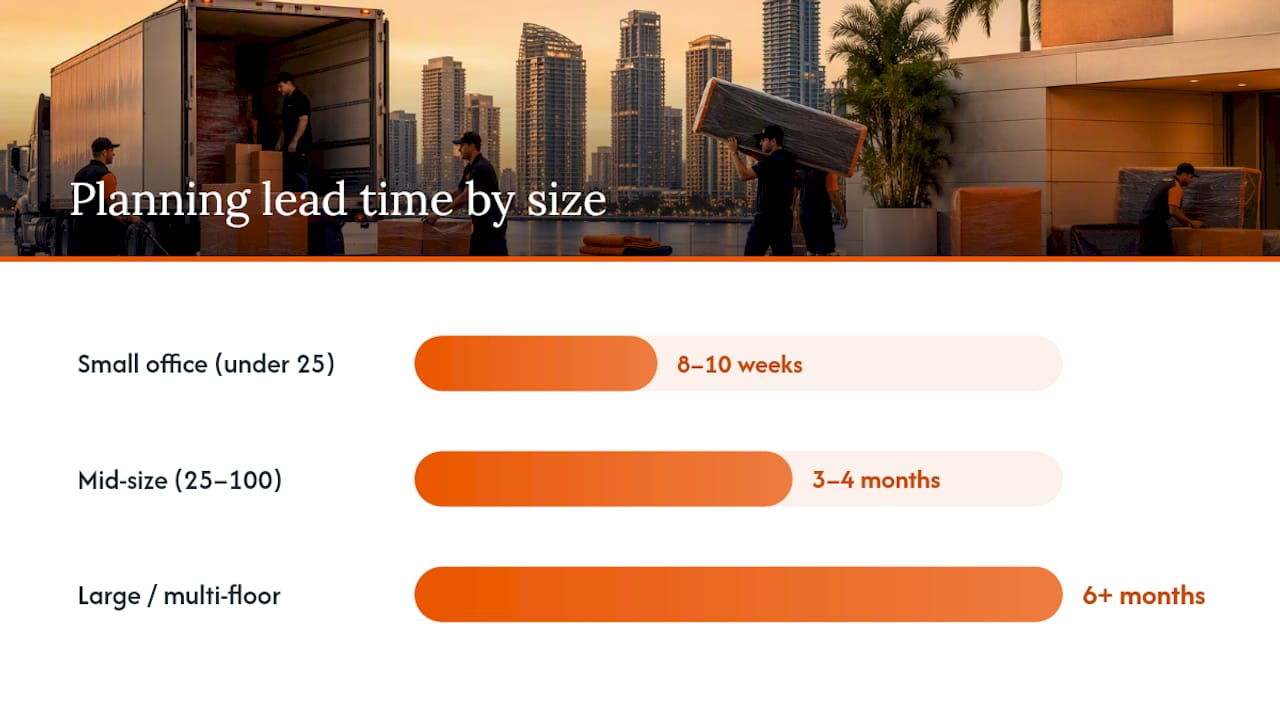
Guideline start windows:
- Small office (under 25 employees): 8 to 10 weeks before occupancy
- Mid-size office (25 to 100 employees): 3 to 4 months before occupancy
- Large or multi-floor office: 6 months or more, especially with server rooms or specialized equipment
At this stage, pull your lease and read the fine print on break clauses, early-termination penalties, and restoration requirements. Many commercial leases require the space returned to its original condition, which means patching walls, removing signage, or reinstalling flooring, at your cost. Photograph every room's current condition before you touch anything, so there's no dispute later.
Set two or three measurable objectives now: a downtime target (how many business hours you're willing to lose), and budget categories covering movers, packing materials, IT contractors, and contingency. Appoint one move coordinator with authority to make calls, plus a department lead in each team who owns their own inventory and communication.
This is also when you start requesting proposals from commercial movers, IT contractors, and telecom providers. Popular moving dates, especially month-end and quarter-end, book up fast in South Florida markets like Fort Lauderdale and Miami-Dade County, so lock your date before you lock anything else.
What Should Happen 6 to 12 Months Before the Move?
This window is about confirming the new space can actually function as an office and locking down the vendors who will get you there.
Start with the building itself. Confirm the certificate of occupancy covers your intended use, and check zoning if you're changing business type. Walk the space specifically looking for ADA compliance gaps, door widths, restroom access, parking, because remediation can add weeks to your timeline if caught late.
Next, formalize your mover selection:
- Request written, itemized quotes from at least two or three commercial movers
- Confirm liability coverage and require a certificate of insurance (COI) before the move date
- Get elevator reservation windows and loading dock access confirmed in writing with the building management, not just verbally promised
- Ask how the crew handles specialty items like safes, server racks, or conference room electronics
Telecom and internet circuits are the quiet timeline-killer in office moves. New fiber installs can take six to eight weeks depending on the carrier and building, so order circuits the moment you sign your lease. Build in a fallback, a temporary circuit or cellular hotspot backup, in case the primary line isn't live on day one.
This is also when regulatory filings enter the picture. If your business address is changing, you'll eventually need to file IRS Form 8822-B to update your address or responsible party on record, and most states require a corresponding update through the Secretary of State. Processing on the IRS side typically takes several weeks, so mark it on your calendar even though you'll file closer to the actual move.
Pro Tip: Ask your commercial mover for elevator and loading dock requirements in writing during the quoting stage, not the week before. Many South Florida high-rises require a certificate of insurance submitted 5 to 10 business days ahead, and missing that window can bump your reserved slot entirely.
Orange Movers works with commercial moving clients across Broward and Palm Beach County who've learned this the hard way: the mover isn't usually the bottleneck. The building's paperwork requirements are.
How Do You Inventory and Purge Before an Office Move?
Every item that gets loaded onto a truck costs you money, time, and floor space at the other end. This is the window to decide what's actually worth moving.
Build a simple inventory template with five columns: item, serial number (for electronics and equipment), current owner or department, condition, and destination room at the new site. Photograph anything valuable, artwork, conference room displays, specialty furniture, before it's wrapped, so you have a condition record if a damage claim comes up later.
- Walk every department and have leads flag furniture, equipment, and files that are obsolete, duplicated, or damaged beyond moving
- Route old electronics through certified channels. The EPA recommends certified electronics donation and recycling programs rather than general disposal, since old hard drives and monitors carry both data and environmental risk
- Cross-check your insurance policy for coverage during transit and confirm the new address is added before moving day, not after
- Collect COIs from every vendor touching the property: movers, IT contractors, cleaners
Businesses that skip a formal purge step routinely end up paying to move, then immediately dispose of, furniture and files they never needed at the new address. A business relocation checklist should always include a lease and insurance compliance review, because gaps in either one tend to surface as fines or coverage denials, not as anything you catch during packing.
Once your inventory is set, announce the move internally with a clear split: what employees pack themselves (personal desk items, sensitive documents) versus what the movers handle (furniture, shared equipment, IT hardware). Send an external notice to clients, vendors, and your bank around the same time so mail and deliveries redirect smoothly.
Packing, Labeling, and IT Cutover: 1 to 3 Months Out
A color-coded labeling system tied to your new floorplan prevents more confusion on move day than almost anything else you'll do. Assign each department or room a color, then label every box with that color, the department name, and a short contents note (example: BLUE, Accounting, "Filing cabinets, top drawer files"). Movers and staff can match boxes to rooms at a glance without hunting for a spreadsheet.
Your IT cutover deserves its own staged plan, separate from general packing:
- Run final full backups of servers and critical files 48 to 72 hours before the move
- Where possible, migrate on-premises services to cloud environments ahead of the move. CISA recommends this migration specifically because it reduces the physical risk to sensitive data during a transition, and enforcing a clean-desk policy in the final days keeps loose documents and drives from going missing in the shuffle
- Sequence phone porting and internet activation so there's overlap, not a gap, between old and new service
- Test the new network and phone system before moving day, if the space allows early access
Confirm elevator reservations, loading dock windows, and COI submissions to building management now if you haven't already; many South Florida properties won't hold a slot without paperwork on file at least a week out.
Pro Tip: For safes, pianos, artwork, or other high-value pieces, ask for a condition report and photos before wrapping begins. If a claim ever comes up, a timestamped "before" photo settles the question faster than any conversation with an adjuster.
The Final Two Weeks: Confirming Details and Prepping Day-One Kits
- Confirm your crew size, arrival time, and truck count with your mover in writing, and build a move-day contact list with direct phone numbers for the move coordinator, building management, and IT lead
- Print room maps and box manifests for each department lead so nobody's guessing where a box belongs when it comes off the truck
- Assemble "open-first" boxes per department: a few days of basic supplies, plus one sealed IT kit per zone with routers, power strips, key peripherals, and login credentials
- Run a final backup and confirm all critical files are secured before the last day in the old space
- Check that keys, badges, and access credentials for the new site are ready and distributed to the right people
- Send a one-page move-day brief to every employee: arrival time at the new address, what to bring personally, and who to contact with questions
This is the week where small gaps become big problems. A missing badge or a router left packed in the wrong box can stall an entire department's first morning.
What Happens on Move Day and the Following 48 Hours?
Designate one single point of contact at each location, old and new, and have move captains relay issues through a dedicated group chat rather than scattered phone calls. This keeps decisions moving without pulling your coordinator into ten conversations at once.
Load order matters more than most people expect. The last items loaded should be the first off the truck, so put day-one essentials, IT equipment, and sensitive files at the back of the truck, loaded last. Sensitive files and devices should travel separately if possible, in a locked case or with a designated staff member, rather than mixed into general cargo.
Once the truck arrives, IT reconnection follows a strict priority order: core network and internet first, then servers, then phone systems, then printers, then individual workstations. This sequence gets the building's shared infrastructure live before anyone worries about a single desk.
- Photograph and log any damage immediately, before items are unwrapped or moved further
- Notify both your insurer and the mover the same day; delayed claims are harder to substantiate
- Set up a temporary help desk, even just a shared inbox or phone line, so staff have one place to report problems instead of pinging IT directly all day
Pro Tip: Assign one person purely to triage, not packing or unpacking, on move day. Someone who's only job is answering "where does this go" and "who do I call about X" keeps the whole operation from bottlenecking around your move coordinator.
Professional moving crews stage loads specifically to support this reconnection order, unloading IT equipment and core furniture first so your team isn't waiting on the last box off the truck to get back online.

Post-Move Checklist: Administrative Cleanup in the First Month
The move itself is done, but the compliance work isn't. Missing this stage is where most of the hidden cost of an office move actually shows up.
- File IRS Form 8822-B to formally update your business address or responsible party with the IRS; processing typically takes four to six weeks, so file it as soon as the new address is final
- Update your state's Secretary of State filing and any local business licenses tied to your old address
- Check sales tax nexus if your move crosses county or state lines, since that can change your filing obligations
- Run a full systems test: phones, network speed, printer connectivity, and access control, documenting any lingering issues for your IT vendor
- Walk the old space with your landlord, photograph its final condition against your original photos, and formally close out the lease handover
- Settle final vendor invoices and collect receipts for every category in your original move budget
Closing these loops within the first two to four weeks keeps small oversights, an unfiled address change, an unreturned key, from turning into fines or missed legal notices months later.
Field Notes: How Professional Crews Protect Property During a Move
Protection isn't an add-on; it's how experienced crews keep a move on schedule. Floor runners and door jamb protectors go down before anything gets carried through a doorway, and any upholstered or finished furniture gets quilt-wrapped rather than shrink-wrapped alone, since padding absorbs impact that plastic wrap doesn't.
- Staging zones let crews group boxes and furniture by destination room before loading, cutting confusion at unload
- Labeled furniture pads stay matched to specific pieces so nothing gets rewrapped mid-move
- Experienced crews often unload in pre-assigned zones, letting IT reconnect equipment while furniture is still being placed elsewhere in the space
- Full-service packing suits teams with limited internal labor or high-value items; labor-only help works well when staff has already packed and just needs muscle for loading and unloading
For office relocations with heavy paper files or delicate equipment, full-service packing and unpacking removes the guesswork around fragile-item handling entirely.
Why a Written Timeline Beats a Mental Checklist
Most office moves that go badly weren't doomed by a bad mover. They were doomed by decisions made under pressure, three weeks in, that should have been made three months earlier. A written timeline forces those decisions forward, into a window where you still have options.
One coordinator with real authority, backed by department captains who own their own inventory, keeps small decisions from stalling the whole project. And the checklist itself shouldn't disappear after the move. Keep it, note what broke down and what worked, and the next relocation starts from experience instead of guesswork.
— Orange Movers Team
Official Guidance Worth Bookmarking
For address changes, use IRS Form 8822-B directly. For IT security during a move, review CISA's small business cyber guidance. For old equipment, check EPA's electronics recycling guidance before disposal.
Ready to put a timeline into action instead of just reading about one? Orange Movers coordinates commercial moving throughout Fort Lauderdale, Broward County, Miami-Dade County, and Palm Beach County, with licensed and insured crews who handle everything from certificate-of-insurance paperwork to furniture protection and IT-priority unloading. If your team needs help with packing specifically, our full-service packing and unpacking crews can pack an entire floor without pulling your staff away from daily work, and for businesses needing marketing support during a location change, moving company SEO services can help keep local search visibility steady through the transition.
Sources
- About Form 8822-B, Change of Address or Responsible Party - Business | Internal Revenue Service
- Cyber Guidance for Small Businesses | CISA
- Electronics donation and recycling | EPA
- Business relocation checklist for legal and tax compliance | LegalClarity
FAQ
How Far in Advance Should I Start an Office Move Checklist?
Start eight to ten weeks ahead for a small office and three to six months ahead for a mid-size or large one, since early planning is the strongest predictor of a smooth move. Larger moves need more lead time mainly because IT circuit installs and building approvals take weeks to schedule.
What Should Be Included in an Office Move Checklist?
A complete checklist covers lease review, budget and coordinator assignment, vendor selection with insurance verification, IT and telecom cutover, inventory and labeling, legal filings, move-day logistics, and post-move system testing. Missing any category, especially legal filings, is where most relocations run into avoidable fines or coverage gaps according to legal and tax compliance guidance for business relocations.
Do I Need to Notify the IRS When My Business Address Changes?
Yes. Businesses use IRS Form 8822-B to report a new mailing address or a change in responsible party, and processing typically takes four to six weeks. File it as soon as your new address is confirmed to avoid missed IRS notices.
How Should We Handle Old Electronics During an Office Move?
Route retired computers, monitors, and other e-waste through certified recycling or donation programs rather than general trash. The EPA recommends certified channels specifically because old devices carry both data security and environmental risk if disposed of improperly.
Should We Hire Full-Service Movers or Handle Packing Ourselves?
It depends on your timeline and internal labor availability. Full-service packing and unpacking works best for teams with limited staff time or delicate equipment, while labor-only assistance suits offices that have already packed and just need help with loading, transport, and unloading.